How to film whale sharks in La Paz without a dive camera
You do not need an expensive underwater camera to come home with good whale shark footage from La Paz. A phone in a waterproof pouch or a small action camera works well at the surface, where you will be anyway. The tricks lie in the angle, the light and how you hold on.
A phone or an action camera is enough
Every swim in La Paz happens at the surface, within a few meters of the shark. That suits small cameras well, because you never go deep enough for pressure or lost color to become a real problem.
A phone in a sealed waterproof pouch is the cheapest option. Test the pouch in a sink or a pool before the trip, and check that the touchscreen still responds through the plastic when it is wet.
An action camera such as a GoPro is easier to handle. It is small, fully waterproof in its housing and shoots wide, so a shark a couple of meters away fills the frame without any zooming.
Settings to choose before you get wet
Set everything up on the boat, because a wet pouch makes menus hard to reach. Pick the widest lens your phone or camera offers, and switch the screen lock off so recording does not stop halfway through a pass.
A higher frame rate gives you smoother clips and the option of slow motion later. On an action camera, 60 frames per second is a good middle ground that still leaves plenty of battery for the morning.
Charge the night before and clear some space on the card or phone. Wipe the lens or the pouch window just before you slide in, since a single drop or smear blurs every frame you shoot.
Hold on to it
Cameras sink, and the bay floor is not where you want to go looking. Use a wrist strap on a pouch or a camera, or a floating hand grip that keeps the camera at the surface if you let go.
Check the strap and the clips on the boat before your group goes in. The guide will call you into the water quickly once a shark is spotted, and there is no time to fiddle with the kit then.
Shoot video, pick stills later
Whale sharks keep moving while they feed, and so do you. A single photo often catches a blurred tail or a patch of green water, while a steady clip catches the whole animal gliding past.
Start recording before you put your face in the water and let it run. You can pull still frames from the video afterwards, and most phones and action cameras save frames sharp enough to share.
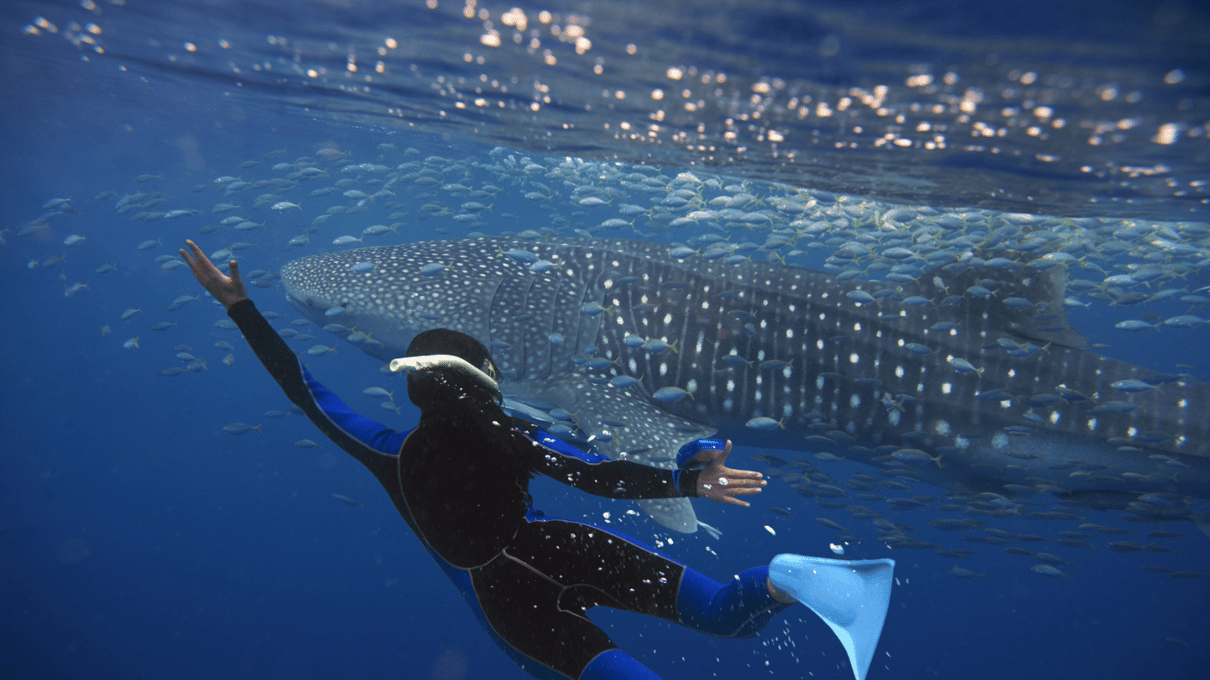
Film from the side, not from above
Looking straight down at a whale shark shows you its spotted back and little else. The best shots come from the side, at the shark's level, where you see the wide mouth and the long row of gill slits.
Stay at the surface and swim parallel to the shark, slightly ahead of its fins. Diving down on top of the animal is against the usual rules, and our guide to the swim rules lists the rest.
Keep the distance the guide sets, usually about 2 meters (7 feet) from the body and more from the tail. A wide lens makes that distance look closer than it is, so there is no need to push in.
Green water and the sun
The water off El Mogote is often green and hazy. That haze is the plankton the sharks come to eat, so the cloudier days can be the busier ones for sightings.
Plankton cuts how far the camera can see. Get as close as the rules allow, and shoot with the sun behind you so light falls on the shark rather than into the lens. Our page on the sandbar where the sharks feed explains the bay.
No flash, no filters needed
Flash photography is not allowed around the sharks, and it would only light up the plankton in front of the lens anyway. Turn the flash off before you leave the boat so it cannot fire by accident.
Red filters help divers restore color at depth, but near the surface they are usually not needed. The light is strong enough, and you can warm the colors a little in an editing app afterwards.
Buy the photos, keep both hands free
Cabo Adventures picks you up in Los Cabos for a day of about 10 hours with a panga swim and a taco lunch, from ~$259, and sells an optional photo CD. Viator shows 4.9 from 1,100+ reviews.
Buying photos or asking the guide
Cabo Adventures' whale shark day from ~$259 is the only tour here that lists photos for sale, as an optional CD. If you want pictures without the bother of a camera, that is the simplest route.
On the two La Paz swims, no photo service is listed. Ask the guide on the day, since some guides carry a camera, but do not count on it. Our price guide lists the other extras worth budgeting for.
Put the camera down for a while
Time in the water with each shark is limited, and a screen between you and the animal can eat it all up. Many swimmers film the first pass and simply watch the second.
Whale sharks are wild and never guaranteed, so treat the footage as a bonus. If the first morning comes back empty, our notes on what to do when no sharks show up help you plan a second try, and the packing list for the boat covers the pouch and strap.